Windows 7 安装 .NET 4.8
Windows 7 系统安装
Win 7 的硬件支持到7代IU, 没有远古设备, 所以采用VMWare虚拟机安装测试.
具体IOS版本为 cn_windows_7_ultimate_with_sp1_x86_dvd_u_677486.iso
安装 .NET Framework 4.8
直接下载并安装 .NET Framework 4.8
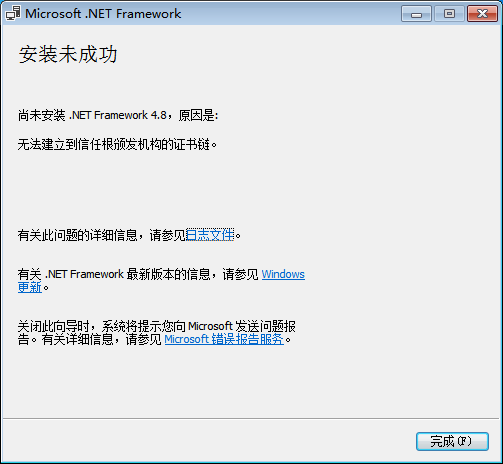
报错:
warning
无法建立到信任根颁发机构的证书链
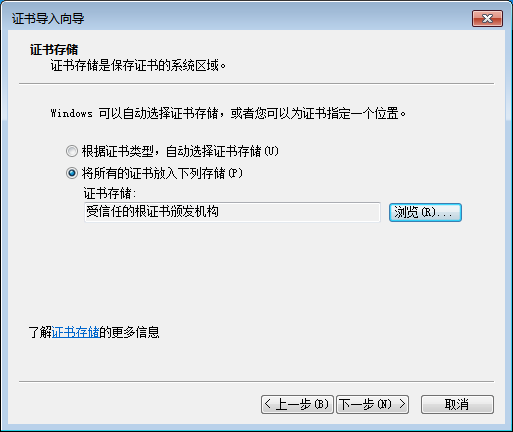
安装CA证书
下载CA证书并安装, 选择“将所有的证书放入下列存储”->“受信任的根证书颁发机构”
再次安装 .NET Framework 4.8
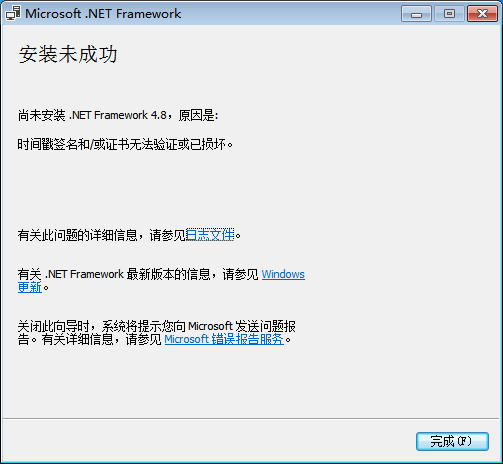
报错:
warning
时间戳签名和/或证书无法验证或已损坏
安装补丁包
StackOverflow 的 帖子 中, 有一个评论提到
The solution didn't work for me. I got "the timestamp signature and/or certificate could not be verified or is malformed." error. For that error I got, need KB4474419 and KB4490628 updates for SHA-2 code signing support.
查看微软的日志, 都是 A security issue has blah blah 的安全更新(仿佛是微信的更新日志: 修复一些已知问题)
但是检索 KB4474419, 有网页提到该补丁包提供了SHA-2代码签名支持.
安装上述两个补丁包之后, 再次安装 .NET Framework 4.8, 成功!
